
Revolutionizing Small Business
Photo via Unsplash
In today's digitally driven marketplace, the influence of social media on business success cannot be overstated. For small and medium-sized businesses (SMBs), leveraging these platforms effectively can mean the difference between obscurity and prominence. Engaging professional social media management can transform your online presence, making it an indispensable investment for growth-focused businesses. This article hosted by Two Step Social explains how professional social media management can significantly benefit SMBs.
Amplifying Brand Visibility
Social media is a powerful tool for increasing brand awareness, but only if it’s used wisely. Professional social media managers know how to craft compelling content that stands out in crowded feeds. By consistently presenting your brand in a polished and professional manner, you capture the attention of potential customers. Professional managers leverage analytics to determine the best times to post and the most engaging content types, ensuring that your messages reach a broader audience. This strategic visibility helps to imprint your brand on the minds of potential customers, gradually building recognition and trust.
Enhancing Customer Engagement
Interaction on social media isn’t just about broadcasting your services or products; it’s about creating conversations and building relationships. Professional social media managers are adept at sparking engagement by initiating and maintaining these conversations. Whether through timely responses to comments or by creating interactive content like polls and quizzes, they keep your audience engaged and interested. This active engagement not only fosters loyalty but also increases the likelihood of your followers recommending your brand to others, effectively amplifying word-of-mouth marketing.
Targeting and Retargeting Ideal Customers
One of the most significant advantages of professional social media management is the ability to use sophisticated targeting tools. Social media platforms offer advanced advertising capabilities that allow businesses to pinpoint their ideal customers based on demographics, interests, and behaviors. Professionals know how to harness these tools to tailor your advertising campaigns, ensuring that your marketing dollars are spent reaching those most likely to convert. Additionally, retargeting strategies can be employed to re-engage individuals who have shown interest in your products or services, increasing the chances of conversion.
Gaining Competitive Advantage
Professional social media management allows SMBs to stay ahead of the curve and gain a competitive edge. By keeping abreast of the latest social media trends and algorithm changes, professional managers adapt strategies accordingly. This proactive approach ensures that your social media efforts are not only current but also more effective than those of your competitors who may not be as well-versed in these nuances.
Achieving Measurable Results
One of the critical benefits of professional management is the ability to track and analyze the performance of different strategies and campaigns. Social media managers utilize tools that provide detailed insights into metrics such as reach, engagement, and conversion rates. This data is invaluable for understanding what works and what doesn’t, allowing for the continuous optimization of your social media presence. Measurable results also mean that you can see a clear return on investment, making it easier to allocate resources effectively.
Freeing Up Your Time
Lastly, entrusting your social media strategy to professionals frees up your time so you can focus on other critical aspects of your business. Managing social media effectively can be time-consuming, involving content creation, community management, and analytics review. By outsourcing this task, you ensure that your social media presence is in expert hands while you concentrate on growing your business in other ways.
Leveraging Free Time for Strategic Branding Initiatives
With professional social media management taking care of day-to-day online interactions, business owners can redirect their focus towards broader branding strategies. Here are four effective ways to use Adobe Express to enhance your branding efforts:
- Create Custom Graphics and Logos: Adobe Express enables you to design custom logos and graphics that reflect your brand's identity. These can be used across various marketing materials to maintain a cohesive visual appearance.
- Develop Marketing Collateral: Utilize Adobe Express templates to create professional-looking brochures, flyers, and business cards. This helps ensure that all your printed marketing materials are on-brand and visually appealing.
- Produce Engaging Video Content: With Adobe Express, you can easily produce and edit short promotional videos that highlight your products or services. Video content is highly engaging and can improve brand recall.
- Customize Digital Advertisements: Use Adobe Express to create eye-catching digital advertisements. The platform's easy-to-use design tools allow you to customize ads that resonate with your target audience, ensuring they are both attractive and effective.
Incorporating professional social media management into your business strategy is more than a mere enhancement; it's a transformative decision that can lead to significant business growth. From increasing brand visibility and customer engagement to managing online reputation and achieving measurable results, the benefits are substantial. For SMBs aiming to expand their reach and impact in a competitive market, professional social media management is not just beneficial—it’s essential.
Ready to take your brand to the next level? Contact Two Step Social today to discover how our expert social media management services can amplify your online presence and drive your business forward!


How To Revive a Stagnant Social Media Strategy
Are your brand’s social media accounts dead? Are you trying to figure out how to revive them? Struggling with a stagnant social media strategy?
If you’re reading this article, then the answer to some of these questions is probably “yes.” Each year, thousands of business owners and marketers give social media marketing a try, but find their efforts falling short.
For example, you might have tried creating a content calendar and creating engaging content in the past. But you found yourself getting busy, other areas in your business had priority over social media, and your social media efforts stagnated. Perhaps, you made a few social media marketing mistakes.
How To Revive a Stagnant Social Media Strategy
In this blog post, we will discuss what it means to have a social media strategy, share some common social media challenges that business owners face, and provide some tips and tricks on how to revive a stagnant social media presence.
As a business owner, there’s never been a better time to build a digital presence online. We hope these insights from the Two Step Social team will motivate you to get your social media presence back on track!
Assess Your Previous Social Media Strategy
If you want to know how to revive a stagnant social media strategy, then it’s important to assess what went wrong in the past. Did you have a process? Did you follow a content calendar? Before investing the time and effort, did you have an end goal in mind?
If you answered “no” to any of these questions, then it’s not surprising that your previous strategy has fallen flat. A successful social media strategy should have the following elements:
- An end goal
- A content creation strategy
- An engagement strategy
- Systems and teams to implement them
Ask yourself: have you have clearly defined each of these elements? Did your previous social media strategy have an end goal? Did you have a clear content creation strategy or schedule? Were you consistently engaging with your users or followers? Did you or a team member truly have the bandwidth to handle these tasks yourself?
These are all important questions to ask yourself if you want to say goodbye to stagnant business growth on social media. Take an hour of your day to sit down and go through each of these questions. By clearly defining your goals and capabilities, you will likely find yourself more motivated to follow through.
Define Your Target Audience
Your target audience greatly depends on the type of business, your industry, and a few other factors. For example, suppose you own a high-end bakery in Mobile, Alabama. In this case, your target audience is likely local families and individuals in the Mobile area who can easily drive to your shop and who have the income to make a purchase of your luxury sweets. If this bakery offers wedding cakes, then another target audience could be local engaged couples.
On the other hand, suppose you’re an attorney who owns a law firm in Charlotte, North Carolina that specializes in commercial and business law. In this case, your target audience is other established business owners who need your services for litigation, trademark issues, or other civil matters. Your end goal is to capture leads who are interested in your legal services.
By clearly defining your target audience, you will develop a better idea of what social media content to create and avoid. When you have a target customer in mind, you will find that the content creation planning process is significantly easier.
Figure Out Which Social Media Channels to Post On
Facebook, Instagram, TikTok, Twitter, LinkedIn, Pinterest, etc… Every month, it seems like there is another channel to keep up with! It can be extremely overwhelming to business owners, especially to those who are new to digital marketing and have faced social media challenges in the past.
Many social media management agencies believe that small businesses should only be active on one or two social media channels. There is some truth to that. On the one hand, you don’t want to be posting to a channel that has few members of your target audience. On the other hand, why not post content to a smaller, less “important” platform if you believe you might get some traction?
At Two Step Social, we believe you should post to all of the social media channels that are relevant to your industry. Then, you can choose the channels on which you would like to spend extra time posting additional content or engaging with your target audience.
Let’s use the high-end bakery in Mobile, Alabama as an example. We believe this business should post to Facebook, Instagram, Twitter, Pinterest, and Google Business Profile. They could cross-post the same content to each of these channels. Why wouldn’t they? There is no downside! However, to save time, perhaps they could invest all extra bandwidth into engaging with others in the Mobile, AL community on Instagram specifically. If there is stagnant Twitter follower growth, perhaps they could spend some time engaging on that platform as well. Pick your battles, and stick with them!
Establish a Consistent Posting Schedule
One of the best social media tips for many business owners is to create monthly or weekly content creation calendars that follow specific themes. For example, you could plan to post a video on Tuesday and Thursday of each week, post a testimonial from a customer/client on Fridays, and stick to general promotional graphics on Mondays and Wednesdays. Be creative with it, but stick to a schedule!
As an aside, don’t feel like your schedule should be set in stone. While you should always have a plan that you stick to, don’t feel like you can make tweaks each month based on how certain content performed. For example, if you find that posting pictures of your team members is not resonating with your audience, but explainer videos are doing exceptionally well, then consider replacing future “team feature” posts with additional explainer videos!
Experiment with New Content Types and Formats
Now that you have identified your target audience, selected your brand’s social media channels, and built out a consistent posting schedule, it’s time to start posting content!
The great thing about social media is that there many different types of content and formats! For example, on Twitter, you can post short-form text content. On Instagram, you can post videos (e.g. Reels). On LinkedIn, you can actually post full-blown “articles!” This is great news to business owners because you can create the types of content that best resonate with your target audience.
At first, maybe stick to only posting regular pictures. There’s no need to get too fancy when you’re just starting out. After a month or two, commit to also posting a video once or twice per week. Once you have the hang of it, start experimenting with carousels, Instagram stories, Twitter polls, or other interactive content types!
Closing Thoughts: How to Avoid Stagnant Business Growth on Social Media
Reviving a stagnant social media strategy involves assessing your previous approach, defining your target audience, selecting the right social media channels, establishing a consistent posting schedule, and experimenting with new content types and formats. By implementing these social media tips and addressing common social media challenges, businesses can breathe new life into their social media presence and foster greater engagement with their audience. Remember, a successful social media strategy requires commitment, adaptability, and a clear understanding of your goals and target audience. Embrace the opportunity to learn and grow, and watch your social media presence thrive.

Top 7 Instagram Marketing Trends of 2023
Whether you’re a business owner or a fellow digital marketer, staying on top of the latest Instagram trends is essential. Social media platforms like Instagram are constantly changing, which means that you have to stay “in the know” if you want to be an effective Instagram marketer.
7 Instagram Trends Every Marketer Should Know
One of our recent blog posts focused on how to build a Facebook marketing strategy. This article will cover the seven top Instagram marketing trends you should keep in mind. As one of the largest social media marketing platforms, if your brand doesn’t currently have a presence on the channel, it’s time to start building one.
1. Reels are here to stay.
One of the most obvious Instagram trends is the push of video content on the platform. To compete with TikTok, Instagram released “Reels” in 2019. Since then, they have become an integral part of the platform. Study after study suggests that posting Reels generates more reach, impressions, and engagement.
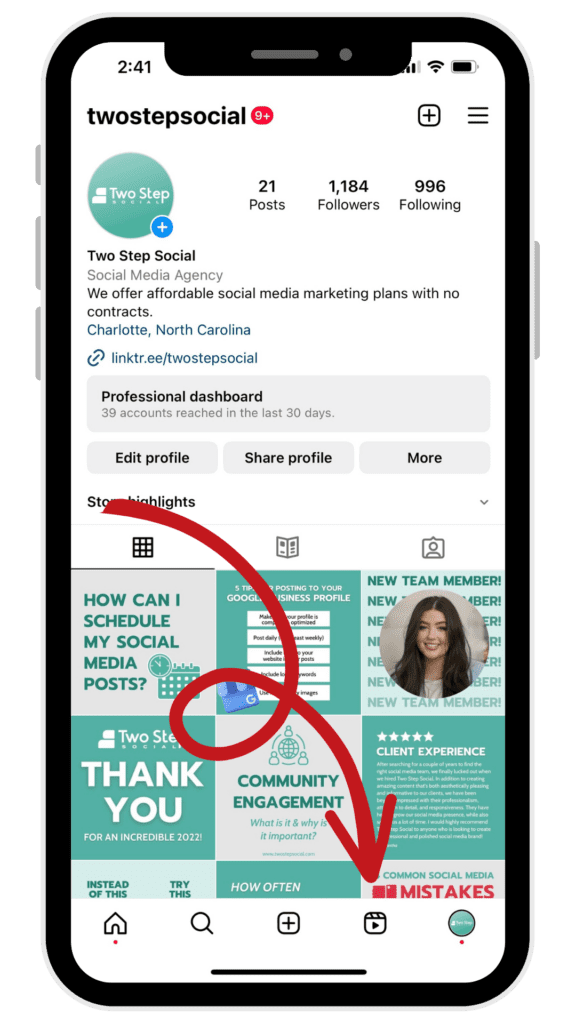
One of the five options on the Instagram navigation bar, which is SUPER valuable in-app real estate, is the Reels icon. This icon's placement is a sign to all Instagram marketers that the platform will continue to focus on Reels. Meta wants to enable their users to scroll endlessly to consume content that matches their interests.
2. Video is “in,” but photos are, too.
“I think we were overfocused on video in 2022 and pushed ranking too far and basically showed too many videos and not enough photos,” said Adam Mosseri, CEO of Instagram.
While the importance of Instagram Reels shows no signs of slowing, expect a slow transition to more “traditional” photo-based content from Instagram marketers. Heavy users of the app would likely agree that Instagram’s push of Reels and video content was quick (and, to some, jarring).
Some probably forget that Instagram was a photo-only social media platform back “in the old days!” While video content certainly has a place on the platform, users still demand high-quality, aesthetically pleasing photo content and graphics - and the leaders at Instagram realize this. In 2023, try to post more still-image content in addition to Reels.
3. Say goodbye to the Instagram shopping tab.
Instagram quickly released and then removed the Instagram shopping tab from the navigation menu. This initial addition of the shopping tab was part of a broader push from Meta to promote users to purchase directly from brands on the platform. They used the shopping tab to show personalized product recommendations based on the user’s interests.
What does the removal of this icon mean for marketers? Well, while there will still be some in-app shopping functionality throughout the platform, this is a pretty clear signal that Instagram marketers should offer users other ways to purchase their products.
Whether this is directly through the website or through a different means, you shouldn’t count on Instagram Shopping becoming more prevalent in 2023. Perhaps this is a sign that Instagram marketers and business owners should invest more in their websites to offer customers a seamless, easy online shopping experience.
4. Interactive features are on the rise.
Instagram is adding more and more features to the platform each month to encourage engagement and interactions between users and brands. Instagram accounts can now include clickable links in their Instagram stories to help drive users to their websites. This can be especially useful if you are trying to capture lead information or sell products online.
Polls, quizzes, emoji sliders, and other interactive “widgets” have been available on Instagram stories for a while, but they are slowly being introduced to Reels as well! As an Instagram marketer, getting followers to engage with your brand should be a number one priority, and this is an easy way to encourage that.
Another notable Instagram marketing tidbit is that the platform now shows users the number of “sends” on Reels, in addition to the number of likes and comments. This is an extremely valuable metric that Instagram marketers can now start tracking to understand what types of video content are most shareable amongst their audiences.
5. Don’t forget about Instagram ads.
As an Instagram marketer, you should always appreciate the power of paid social media advertising. In addition to content creation and an engagement strategy, we consider paid ads to be one of the three areas of social media marketing. While organic growth and engagement are every Instagram marketer’s dream (who doesn’t love the free exposure?), paid ads aren’t going anywhere in 2023.
The great thing about Meta’s Ads Manager platform is that you can target by area, interests, age, and much more. This allows brands to get their content in front of the right people with extreme precision. Instagram ads can be offered in video, carousel, or still-image format, and show up in various areas throughout the platform.
In fact, Instagram ads recently began displaying to those scrolling through specific users’ posts. In other words, if you navigate to another person’s account and start scrolling through their posts, you will see ads!
6. The importance of an engagement strategy.
One of the most important Instagram trends is the increasing importance of implementing an engagement strategy. What does this mean exactly?
First, it’s important to define “engagement.” What does it mean, and why is it important? We define Instagram engagement as the amount of interaction your account receives from others. Interaction includes likes, comments, saves, and DMs. The more interactions you receive, the better, because this indicates that your content is interesting to users.
To get more engagement, you should not only post interesting and relevant content, but you should also make an effort to follow other accounts in your space, leave comments on posts, and send DMs. These are all signals to other accounts that your brand is a legitimate player in the industry, increasing the odds they follow you back and engage with your content in the future. The Instagram algorithm, while mysterious, clearly favors accounts that both engage with content, and receive engagement from others.
7. User-generated content.
What is user-generated content? UGC simply refers to posts from your customers or clients talking about your brand. Ideally, the UGC is positive and acts as a testimonial or review about the brand that you can share.
UGC is important for a couple of reasons: it helps make your brand look more authentic, and it can signal to others that your business is legitimate and offers a solid product/service.
In 2023, brands should brainstorm ways how to integrate UGC into their feeds. It’s undoubtedly an Instagram trend that businesses are taking advantage of as a source of social proof.
Main Takeaways of 2023 Instagram Trends
Instagram is one of the largest social media platforms in the world. As a marketer or business owner, it’s vital to have an Instagram strategy to engage with your existing customers and to reach new ones. While the Instagram algorithm is always changing, these seven 2023 trends can act as a guide on how you should spend your time and efforts growing on the platform.
Have questions? Get in touch with the Two Step Social team today. We have experience helping hundreds of brands grow on the Instagram platform, and we can help you, too. Our plans start at only $99 per month, and you can cancel anytime. What are you waiting for - start building an online presence today!

Pros and Cons of Hiring a Social Media Manager
Pros and Cons of Hiring a Social Media Manager
Hiring a social media manager can help save you time, grow your business, and build an online presence. Depending on who you hire, it can be a relatively cost-effective marketing expense. However, with any decision you make as a business owner, there are pros and cons, and you have to make sure every dollar is spent wisely and with intention.
In this blog article, we will review the pros and cons of hiring a social media manager for your business. If you have any questions, get in touch with our team, and we’ll be happy to help!
The Pros of Hiring a Social Media Manager
1) It will legitimize your business online.
Hiring a social media manager enables your business to appear professional and active on platforms like Facebook, Instagram, LinkedIn, Twitter, and more. Billions of people use social media to interact with friends and favorite brands.
By hiring a social media manager, you will build and maintain a social media presence that will make your business look active and legitimate. One of the worst things you can do is create social media profiles but stop posting for months and years. You don’t want people to think you’re going out of business! Even posting only once per week is enough to give the impression that you’re still active and in business. Hiring a social media manager fixes this problem.
2) Connect with existing and potential customers.
Study after study suggests that a supermajority of consumers research a business online before making a purchase. By maintaining a presence on various social media platforms, potential customers can learn more about your products or services. Hiring a social media manager will also ensure your existing customers stay connected with your business.
For example, suppose you own an Italian restaurant. By consistently posting appetizing pictures of your best-selling meals on social media, more and more customers will interact with the content, making them more likely to want to return!
3) You will save hours each month.
If you agree that legitimizing your business and connecting with customers online is important, then you really have two options: do it yourself, or hire someone to do it for you. As a business owner, we know you are busy. Very, very busy. Building a brand isn’t easy! The time you can save by hiring a social media manager is, in our opinion, one of the greatest “pros.” We have had dozens of clients tell us that the time we have saved them on social media has allowed them to spend more time in other areas of their business.

Suppose you post only three times per week - approximately a dozen posts each month. Creating an eye-catching graphic and writing a captivating caption takes a minimum of ten to fifteen minutes. Then, you must remember to publish the post across each channel multiple times per month. You’re looking at four to five hours per month - at the very least! Hiring a professional who creates hundreds of social media posts per month gives you the best of both worlds: high-quality graphics and saved time that you can spend elsewhere.
4) Build a strong, consistent brand.
One of the “soft” benefits of hiring a social media manager is that you will start building a powerful, consistent brand online. By posting content with the same color palette, fonts, style, etc., your followers and customers will begin to recognize your posts and associate them with your brand.
Creating posts with a consistent style and theme requires the experience of a social media manager with graphic design skills. That’s not to say you couldn’t learn graphic design skills yourself - you certainly could. But it takes many months of training and experience to get to a point where you can create a high-quality graphic in under twenty minutes.
The Cons of Hiring a Social Media Manager
1) It isn’t free!
This is one of the most obvious (but most important!) downsides of hiring a social media manager. They cost money! As we wrote in a previous blog post, social media management services wildly range in pricing and scope. They can range from someone overseas charging $5 to $10 per hour to a full-service marketing agency charging thousands per month. That money could be spent on other aspects of your business, or in different marketing avenues.
At Two Step Social, our pricing is very open and transparent. We’re not the cheapest, but we’re definitely not the most expensive. However, our pricing is highly competitive for high-quality, US-based social media management services. We pride ourselves on the fact that our clients stay with us an average of three to four times longer than our cheaper competitors. This is because we provide a significantly more premium service without the “pomp and circumstance” of a traditional marketing agency. Some of our clients have been using our service since our founding in early 2021!
2) No one will ever know your business as well as you do.
The reality is that you know your business better than anyone else. Full-stop. The best social media managers in the space will work tirelessly to learn your brand and research your niche, but they aren’t dealing with your customers/industry on a daily basis. Outsourcing the management of your brand to an external party can be nerve-wracking - and it’s perfectly normal to feel that way.
A robust onboarding process ensures that a social media manager gets the necessary information he/she needs to create social media content that is intentional, relevant, and on-brand. At Two Step Social, we will research your website, Intake Form, and any additional materials you provide. You will also be assigned a social media manager who will be the one creating your content and requesting feedback from you on a monthly basis. This person will learn about your business throughout the course of our relationship.
3) It can be challenging to find the right person or company.
There are literally thousands of social media management companies and contractors out there. Given the vast quantity of options, a lot of time is invested in trying to find the right person or company for the job.
When businesses reach out to our team at Two Step Social, they generally fall into one of two buckets: i) they found the right social media management contractor/freelancer, but that person had moved on to a different career or position; ii) they thought they found the right social media manager, but after a month or two of working with them, they found they weren’t getting satisfactory service. In other words, finding a social media manager that is both dependable and professional is not always easy.
Closing Thoughts
While hiring a social media manager takes time & energy upfront, it is a relatively cost-effective marketing strategy that can help save you time and build an online presence. Yes, you’re looking at a few hundred dollars each month in extra expenses, but you’re also looking at building a brand, getting exposure with your customers, and saving hours each month that could be spent on a different area of your business.
At Two Step Social, we’re here for the long haul, and we know what we’re doing. Social media is our bread and butter. We have provided top-notch social media management services to over 300 brands. If you want to work with a partner who gets to know their clients’ brands, then you’re in the right place. Connect with our team today to learn more about our service and to see if we would be a good fit.

The Four Types of Social Media Managers
Are you a business owner looking to outsource social media management for your brand? If you’re reading this blog article, the answer is probably yes. At this point, you know you want to start building a social media presence, but you might not be sure how much to spend or which services are the most important. We get it - thousands of social media managers are out there, and they all structure their service offerings a little differently. This article will review the four types of social media managers and which is best for your business.
Types of Social Media Managers: Agency vs. Specialist vs. Budget vs. Freelancer
Social media managers fall into four different buckets:
- Traditional, full-service agencies
- Social media specialists
- Budget-friendly social media “shops”
- Independent freelancers or contractors.
Prices for these providers can range from thousands of dollars per month for a traditional agency to $5 to $10 per hour for outsourced freelancer labor. Additionally, each of these providers might offer various types of services, each in a different area of social media marketing. Let’s go through each of these options to help you decide which is the best fit for you.
1) Traditional, Full-Service Agencies ($$$$)
Price: Starts at around $1,000 to $2,000 per month.
Contract Terms: Typically require multi-month or annual retainers.
Service Offerings: In addition to social media management, full-service digital marketing agencies often offer website design, SEO, paid social advertising, and PPC services.
Best Fit: Medium or large businesses with robust marketing budgets.
Full-service agencies can be an excellent fit for established businesses with large marketing budgets. These firms not only offer social media management services, but they tend to also offer many other marketing services, from paid advertising and website design to brand development and SEO. Working with one of these firms isn’t cheap - they often charge thousands of dollars each month and require multi-month or annual contracts. If your business is looking for a team to help you achieve various marketing goals, consider hiring a traditional marketing agency. On the other hand, hiring a full-service firm is likely unnecessary if you are looking for only one or two specific digital marketing services.
2) Social Media Specialists ($$ to $$$)
Price: Ranges from $100 to $1000 per month.
Contract Terms: Some require contracts; some don’t require contracts. Depends on the provider.
Service Offerings: These teams focus exclusively on social media marketing. They can specialize in paid social media ads, organic content creation, and/or social media engagement.
Best Fit: Businesses of any size who need assistance with only social media. These businesses usually have other team members/contractors helping with websites, SEO, branding, etc. These businesses don’t want to outsource social media management to just anyone; they want to work with a partner who knows and understands their brand.
Social media specialists are perfect for established businesses that want a niche professional marketing partner who will work to understand their brand but won’t charge an arm and a leg. Two Step Social falls under this category; our pricing ranges from only $99 to $499 per month, and we don’t require contracts. Your business is likely a good “fit” for a social media specialist if you want to work with someone on a long-term basis who will get to know your brand. Unlike full-service agencies, social media specialists usually offer only one or two services - but those services are their bread and butter.
3) Budget-friendly Social Media Shops ($ to $$)
Price: Ranges from about $50 to a few hundred dollars per month.
Contract Terms: Rarely requires contracts, usually month to month.
Service Offerings: These shops usually offer a handful of social media services but don’t typically offer website development, SEO, or branding service.
Best Fit: Small businesses with limited marketing budgets who want a consistent presence. These businesses are willing to pay a little less for a lower-quality service. The content generated by these firms isn’t great or terrible - it’s usually just “okay.”
If your small business is looking for one of the most cost-effective but reliable options, then a budget-friendly social media “shop” is probably the best fit for you. Like social media specialists, these shops also offer monthly plans. However, unlike a social media specialist, they likely won’t work to understand your brand fully. You probably will not be assigned an account manager, or if you are given an account manager, the actual work is performed by overseas contractors. However, you must be prepared to receive sub-optimal social media content not fully customized to your brand. That’s not to say this isn’t a great option for some businesses - it certainly can be a good fit for those who just want a consistent social media presence but aren’t too concerned about custom branding, brand voice, etc.
4) Independent Freelancers or Contractors ($)
Price: Ranges from $5 to $100 per hour.
Contract Terms: Freelancers usually offer their services on an hourly or (loosely) monthly basis. Rarely do freelancers require contracts.
Service Offerings: Small, independent freelancers can usually customize their service to fit your needs.
Best Fit: Small businesses or “solopreneurs” who aren’t looking to hire an established company for their social media needs. Instead, they want to work with an individual who can customize their services to the business’s specific needs. However, because you aren’t working with an established business with quality controls, it’s not uncommon to encounter unprofessional behavior.
Last but not least, independent freelancers are the most cost-effective option when it comes to social media management. Generally, you get what you pay for. We have had countless conversations with business owners who initially used independent freelancers but had a bad experience. On the other hand, we have had many discussions with brands who found a great freelancer who managed their social media accounts. However, the freelancer moved on from the role into a full-time job, stopped offering the service, or just had a life change. Freelancers can be an excellent fit for small business owners or solopreneurs looking to save, but don’t be surprised if you encounter unprofessionalism or unreliability.
Main Takeaways
If you have read this far, it probably means you are pretty serious about hiring a social media management partner. We have had thousands of conversations with business owners like you who are weighing their options. Get in touch with our team today to discuss which options are suitable for you. If we think you would be a better fit for a different “type” of social media manager, we won’t be afraid to tell you. We work only with brands that we believe will benefit from our service. After all, your success is our success.

How To Build a Facebook Marketing Strategy
Many of the business owners we speak with are frustrated by the lack of engagement or growth of their social media channels, especially with Facebook. Sound familiar?
Despite best efforts, poor engagement and minimal page growth are the norms. The reason: no real strategy! It's the biggest social media mistake. Managing your company's social media platforms is much different than managing your personal ones. Remember those days when posting random photos of your cat got the job done? Long gone ...

Articles across the internet will lead you to believe that creating an effective Facebook marketing plan is a complicated undertaking. It's not. Here, the Two Step Social team lays out a step-by-step "Facebook Marketing For Beginners" guide!
How To Build an Effective Facebook Marketing Strategy
There are some simple steps to building an effective Facebook marketing strategy, and each step naturally leads to the next.
Steps for Building The Foundation for An Effective Facebook Marketing Strategy
- Set Goals
- Identify Your Audience
- Respect Your Audience
- Understand Facebook’s Algorithm
- Measure Results
1. Set Goals
Building brand awareness and an engaged audience on social media takes time and effort -- things few business owners can spare. Seeing a return on your investment of both requires that you start with goals. Begin with the ideal results of your social media marketing plan in mind.
What are some social media goals you should be thinking about? ‘
Do you want to:
- Increase brand awareness
- Drive traffic to your company website
- Communicate with potential customers (via Messenger or WhatsApp)
- Build relationships with followers and strengthen loyalty
Clarity will help to inform your strategy.
2. Identify Your Audience
As most marketers will tell you, the problem with billboard ads is they aren’t very targeted. Tens of thousands of people drive by billboards with no interest in -- or no notice of -- what’s being advertised. Your mission, as an effective social media marketer, is to avoid publishing content to the masses. Doing so will put you at risk of throwing your marketing dollars out of the (car) window.
Understanding who is in your targeted audience and what their interests are will help to inform what you should post -- and where.
How to Identify Your Audience
Assuming your business already has a Facebook page, Facebook’s Audience Insights gives intricate detail about the age, gender, and location of your customers.
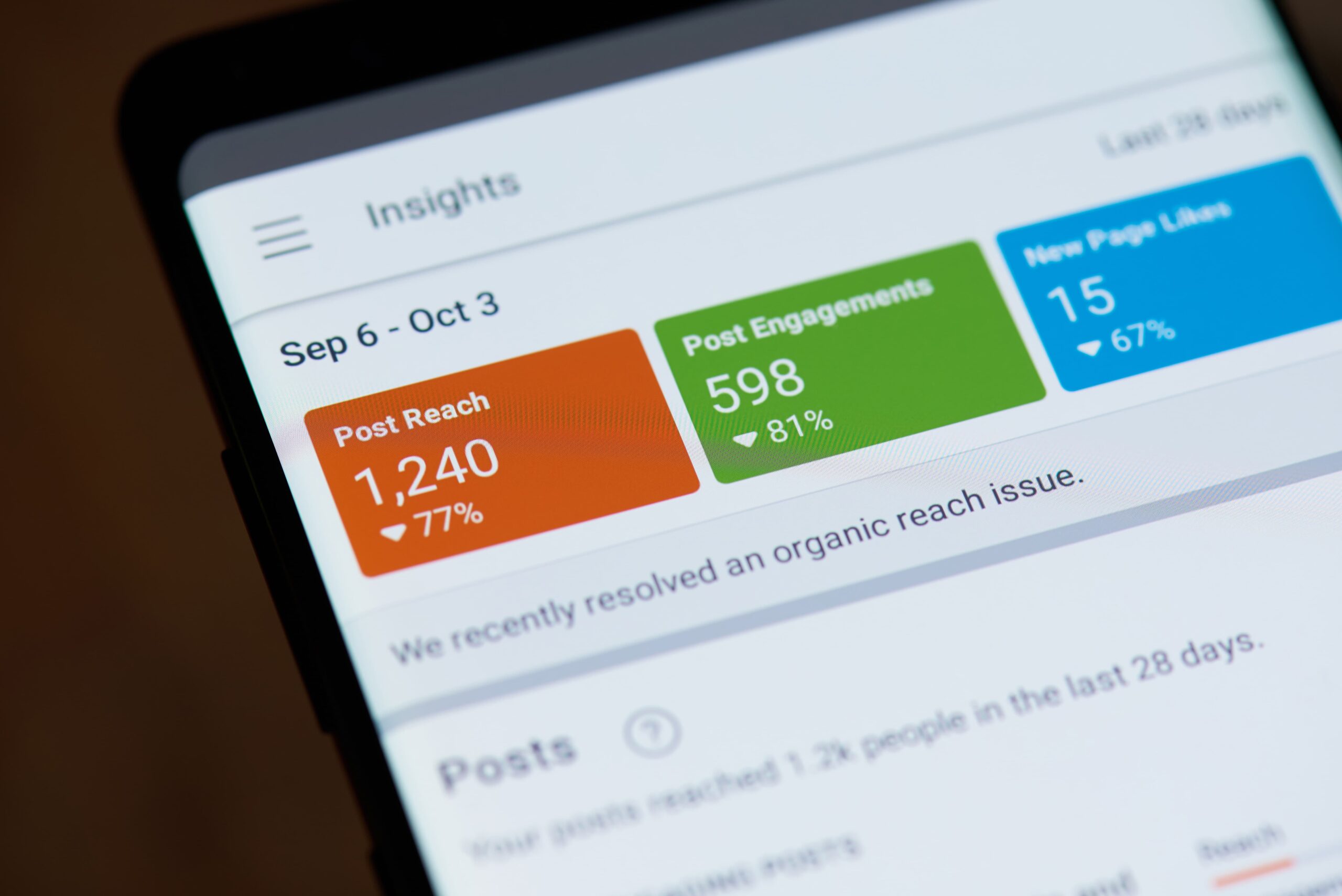
If you haven’t yet established a Facebook page, you’ll need to begin by identifying key demographics about your primary customers:
Typical age range. Usually segmented into age categories: 18-24, 25-34, 35-44, 45-54, 55-64, and 65+
Typical gender. Shown as male or female.
Location. Usually shows the zip codes in which your customers likely live.
Occupation. Indicates interests and income.
Usage. When your customer base is likely to be using social media.
“Understanding who your audience is, where they live, and their interests give clarity on how to resonate. Resonance is what you’re after!” - Sydney Hancock, Two Step Social
3. Respect Your Audience
If your Facebook marketing strategy is all about self-promotion, then you're going about your social media strategy all wrong. Hone in on the word, “social.” Being social doesn’t mean talking at people, it means engaging with people. It's reciprocal; an exchange.
Think of your social channel like a cocktail party. Talking nonstop about yourself and laughing at your own jokes will leave you standing alone --- but if you're a good listener, find ways to connect with people, share humor together, and don’t take yourself too seriously, you’ll own the room! This, in a nutshell, is how you work your Facebook channel.
Your social media shouldn’t be like Mike (sorry, Mike):
Your content should present a mix. The vast majority, about 80%, should be a blend of fun (if your brand allows for fun), inspiration, education, and authenticity. Only 20% of your posts should be promotional, and that’s on the high end!
In his book, Jab, Jab, Jab, Right Hook, Gary Vaynerchuk explains the importance of building trust with an audience before hitting the audience with a promotion.

To be a master at social media means to be a community leader by providing value, building up others, and providing services that help them. - Will Brown, Two Step Social
4. Understand Facebook’s Algorithm
As you publish content to Facebook, it’s important to think about what makes Facebook tick.
Facebook makes money by displaying ads. The longer people are engaged on the platform, the greater their ability to maximize profitability. To achieve this, Facebook must keep users entertained by serving up the best content, which the algorithm identifies by way of engagement: likes, comments, and shares.

“As a social media marketer, your job is to create engagement by resonating with your audience. Marrying great content (photography or video) with the right copy results in engagement and greater brand awareness. In a nutshell, this is what great social media marketing is all about.” - Will Brown, Two Step Social
5. Measure Results (and Learning)
When you first begin to publish content, your results will be mixed -- some posts will have high engagement; others will have very little. Rather than continuing to post aimlessly, take time to review your data to discern what resonates and what doesn’t. You can do this by clicking on the Facebook Insights page linked to your business account. Click here to read our blog post about Measuring Success.
Test the hypotheses you glean from the data by giving your customers what you think they want, and then review the data again. Rinse and repeat until you find your formula. (And when the data tells you something different, start testing again!)
Closing Thoughts
Don’t get frustrated! Becoming a great social media manager requires testing, testing, and more testing. Today's best social media managers finessed their Facebook marketing strategy by doing, measuring, and learning. Keep the above five steps in mind, and you’ll begin your social media marketing journey on the right foot! Need help? Contact us today for a consultation!

Top 5 Social Metrics to Measure Success
Welcome to the only blog post on the web where you’ll learn about social media tracking and reminisce about the glory days of Puff Daddy. (No boring blog posts at Two Step!)
In our most recent blog post, we shared how to build a Facebook marketing strategy. Now, let’s talk about the next most crucial step: tracking social media results and measuring for social media success.
All About the Analytics, Baby
(Humming “All About the Benjamins”? Yeah, we are too.)
Every social media platform has native analytics tools to help you measure social media engagement. The better you are at creating content that your audience likes, the further your social media reach – which is not only better for the social media platform itself but also for your business. It’s a win-win!
Below are the most essential KPIs (Key Performance Indicators) you should be tracking for unpaid posts to help you become the social media master that nobody can hold down! As a bonus, we’ll put these metrics into context, and break through the “marketing speak” to help you understand what’s most relevant and why from your social media reports.
Key Metrics To Track for Organic (Unpaid) Social Media Posts
- Audience Growth Rate
- Reach
- Engagement
- Impressions
- Referrals
1. Audience Growth Rate
Audience Growth Rate is a social media reporting metric that measures how quickly a page gains followers monthly. The growth rate is easily made by calculating the difference between followers on the first day of the month and the last day of the month, divided by the followers on the last day of the previous month.
This wordy equation sounds way more complicated than it is, so we’ll let it sink in a moment …
Followers on Last Day of the Month minus Followers on First Day of the Month
___________________________________________________________________
Divided by Followers on the Last Day of the Previous Month
This isn't rocket science, as more followers gained over the month prior shows you’re doing well, but tracking this growth metric through time will indicate whether your followers continue to like what you're posting. If the growth rate percentage begins to slip, then it’s time to dig back into your social media analytics and reevaluate what you post and when.
Simply put: a high growth rate, good. Declining growth month over month, bad.
2. Reach
Reach is a simple metric that highlights how many people have seen your post, reel, story, or video. Reach = exposure. Greater engagement opens the algorithm to allow for greater exposure!
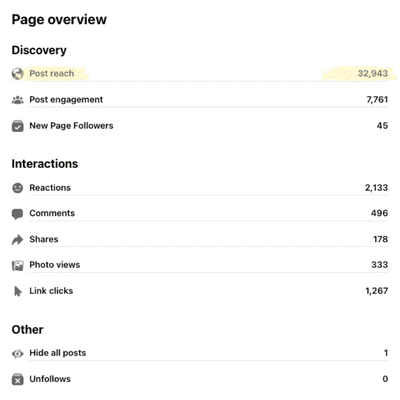
An important detail within a subcategory of reach metrics is the comparison between followers who have seen your content and non-followers. If many non-followers are seeing your content, it’s an indicator that your posts are resonating with your broader audience (winning).

Note: Reach is different from impressions, which may include multiple views of your posts by the same people. More on impressions in #4 below.
3. Engagement
Tracking social media engagement metrics (likes, comments, shares, mentions, and tags) brings clarity to what your audience wants from your platform and should drive your direction on what to publish and when. User actions that count towards engagement on Facebook and Instagram are:
● likes
● comments
● shares
● link clicks
● tags
● saves
● direct messages
● mentions (tagged)
● profile visits
● replies
● regrams (Instagram)
● texts
● calls
● sticker taps (Instagram Stories)
● emails
● “get directions” (Instagram only)
4. Impressions
The impressions metric highlights how often your content appears on someone’s screen. Marketing agencies love to share this metric with their clients because the numbers are usually impressive, but honestly, they don’t tell the whole story.
The impressions metric doesn’t define how many people “saw” your post or “engaged” with it – it literally shows how many times it was on screen, so it’s possible that those people scrolled right past your post. The value in tracking this data point is for the social media manager as it’s an indicator of the quality of one’s posts through time.
As a social media manager, it’s easy to get lost in the data and become paralyzed by what to post. Keep it simple! If you’re posting the same things as everyone else, then you’re not differentiating yourself from all the rest, which is kind of the point of social media.
5. Referrals
Referrals or “referral traffic” is the measurement of site traffic your website receives directly from social media or any other website.

If your goal is to increase website traffic, then this is a key data point to measure. To do this, social media managers should position links to site pages (like value-rich blog content) within social media posts. Tracking referral traffic can be done using Insights on Facebook or via Google Analytics.
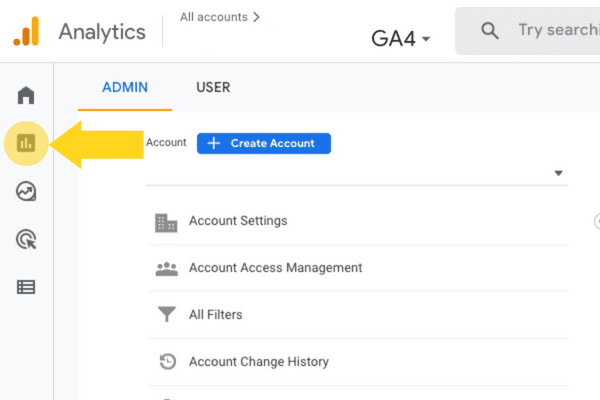
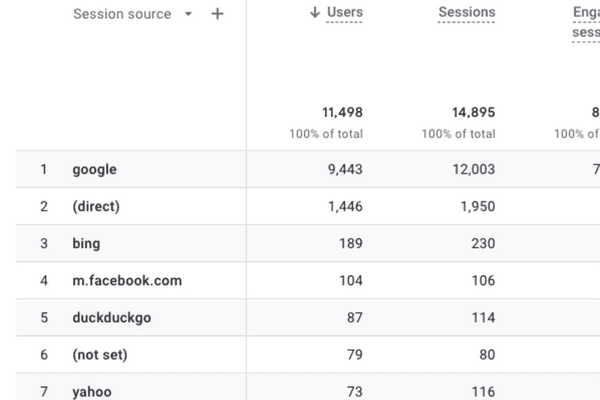
How to Find Referral Traffic in Google Analytics 4 (GA4) 2023
Step 1: Log in to Google Analytics
Step 2: Navigate to the Reports tab on the left menu
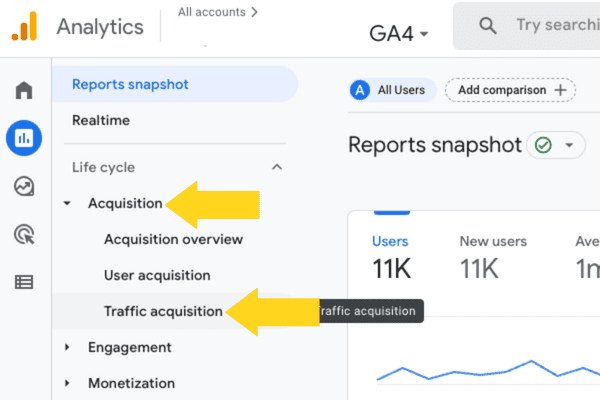
Step 3: Select the dropdown arrow next to Acquisition
Step 4: Select Traffic Acquisition
Step 5: Select the dropdown menu “Select default channel group”
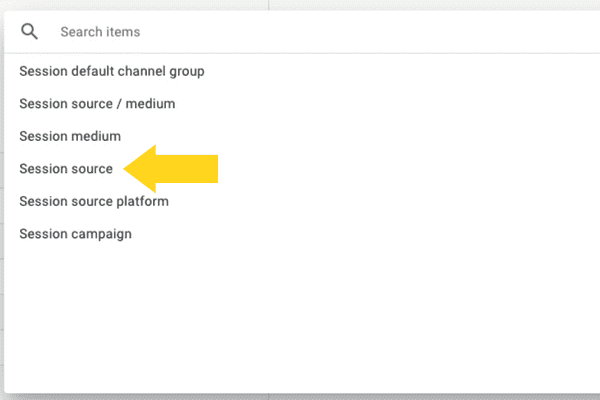
Step 6: Select Session Source
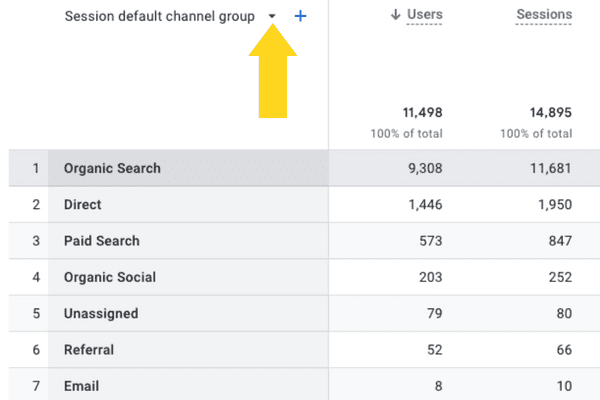
Step 5, Select the dropdown arrow to see more options
Understanding the data behind social media analytics goes beyond the five key metrics highlighted in this post. If interested in taking a deeper dive, we’ve provided some excellent resources below.
Resources for Understanding Social Media Tracking Platforms
● Facebook Help Center | Insights
● Instagram Help Center | Insights
● Twitter Help Center | Insights
● TikTok Help Center | Insights
● YouTube Help Center | Insights
AND FINALLY…
If you’re new to social media and feel intimidated by the glossary of social media data terms, and don't want to deal with any of this … leave it to the experts at Two Step Social. Get in touch!
Meanwhile, those Diddy earworms got us curious. Did you know that Sean Combs – aka: Puffy, Puff Daddy, P. Diddy, Diddy, Sean John, Swag, Love, Brother Love – now goes by Diddy worldwide except for in the UK? There’s another artist in the UK who already uses the Diddy, so Puff had to stick with P. Diddy over there! #nowyouknow

How To Grow a LinkedIn Account
LinkedIn is an excellent platform for B2B businesses and professionals. Not only can it bring social proof to you and your business, but eventually, it can be a source of leads for your sales pipeline. The blog article includes information and tips on how to grow on LinkedIn with robust content and an engagement strategy.
LinkedIn Personal Profile vs. LinkedIn Company Page
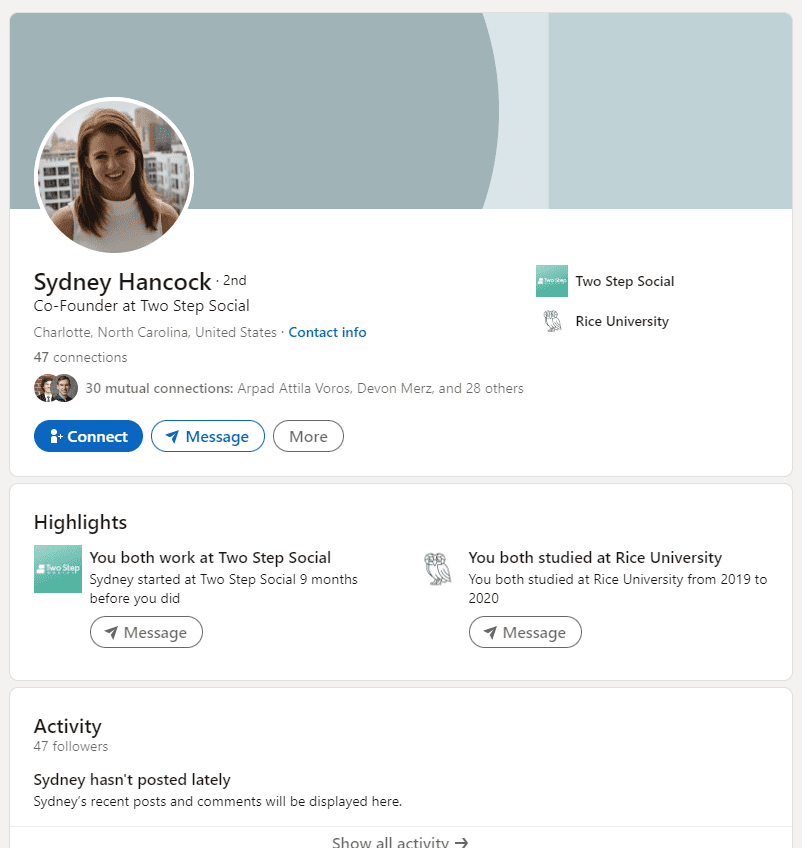
LinkedIn Personal Profiles and Company Pages are two different animals. Your LinkedIn Personal Profile is built around your individual professional life. It's essentially a digital CV, where you can include information on your work history, certifications, education, professional skills, and more.
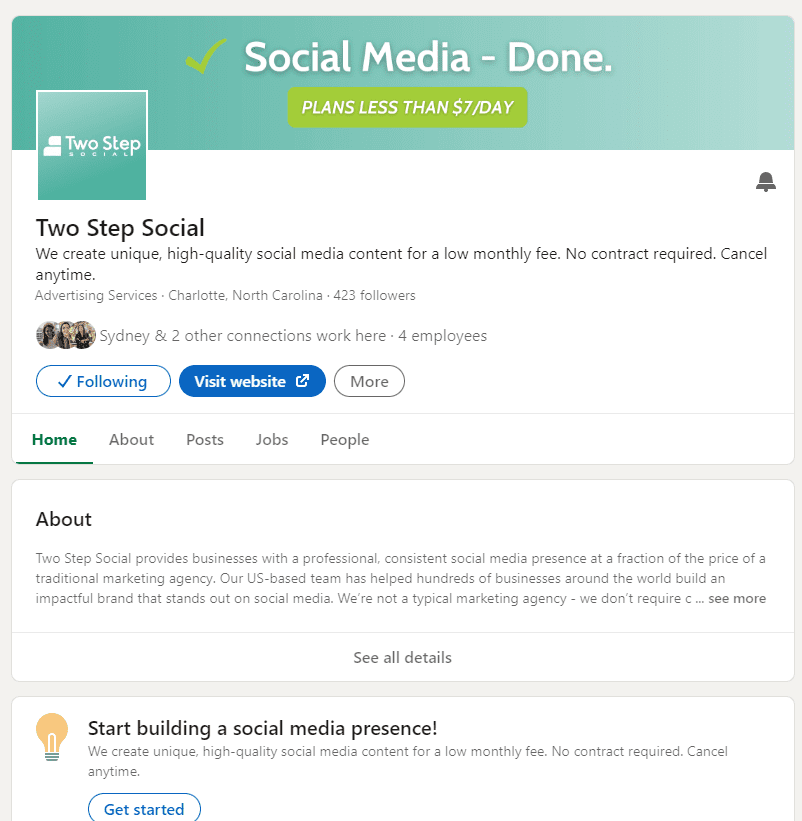
A Linked Company Page is a unique profile for your company or brand. Users can learn about a brand, engage with their posts, see its employees, and more on Company Pages. Employers can also post job openings and utilize LinkedIn's robust application management tools.
If you are the owner of a small business, it's recommended that you have both a Personal Profile for yourself and a Company Page for your business. It keeps things tidy and separate, and allows users to interact with your Company Page but not you personally, and vice versa.
Posts on each of these can be the same or overlap, especially if you are the owner of the business.
What is "Creator Mode" on your LinkedIn Personal Profile?
LinkedIn allows you to turn on "Creator Mode" in your Personal Profile settings. Turning this on gives you access to more tools and features that can help you grow on LinkedIn and increase engagement. According to LinkedIn, here are the features you unlock:
1) Follow Button. Your profile's "Connect" button will be replaced with a "Follow" button. Don't worry; people can still connect with you.
2) Connection Requests. When someone sends you a connection request, they will automatically follow you, regardless of whether or not you accept your request.
3) Business Topics. You can insert hashtags of business topics you post about on the top of your profile.
4) Live and Newsletter. You can take advantage of LinkedIn Live and Newsletter. LinkedIn Live is simply a video streaming tool, while LinkedIn Newsletter is a tool that allows LinkedIn users to subscribe to your articles.
5) Better Analytics. You get access to creator analytics.
6) Clickable Link. A website link can be added to the introduction section of your profile.
7) Featured Creator Eligibility. Your profile can become eligible to be featured as a suggested content creator to follow.
If you plan to post content on LinkedIn regularly, you should switch to a Creator account. To do this, navigate to your Personal Profile, scroll down to the "Resource" section, and toggle on Creator mode.
LinkedIn Growth Metrics to Watch
It's important to define what "growing" actually means. "Growing" means a steady increase in the number of people interacting with you and your content. In the LinkedIn Creator analytics, it breaks it down into the following three metrics.
1) Impressions: The number of times your posts were displayed to users. It's important to note that this is not the same as the number of users who have viewed your posts, because some users may have viewed your posts more than once.
2) Engagements: The number of times your posts were liked, reacted to, commented on, or reposted.
3) Followers: The number of users following your LinkedIn Personal Profile. Note that this is different from the number of connections you have; just because someone is following you, doesn't mean someone is connected with you.
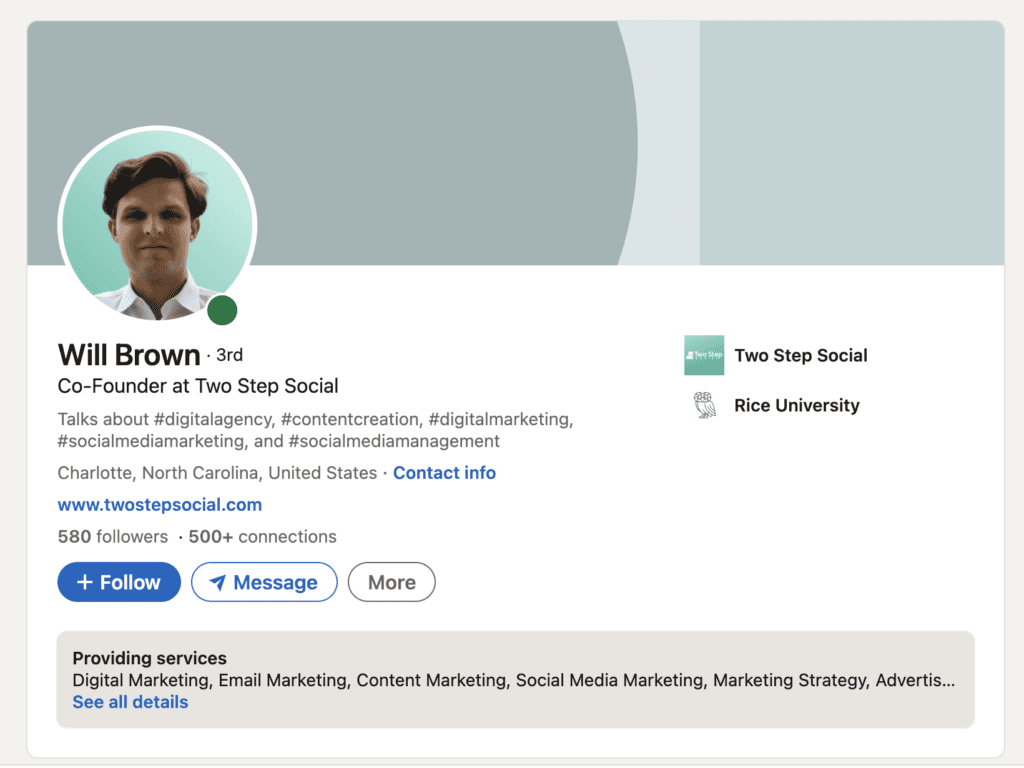
How to Grow On LinkedIn
Typically, two categories of people hire a social media manager like Two Step Social:
Category One: Businesses/professionals who would like a consistent, professional presence on social media platforms like LinkedIn, and they aren't necessarily looking for rapid growth. These people know that existing and potential customers are following them and searching for them on social media. They want to consistently post content to appear active and legitimate. These folks are not necessarily looking to increase their follower counts or engagement; they just want a steady presence, and don't want to spend time creating posts.
Category Two: Businesses/professionals who would not only like a consistent, professional presence on social media but would also like to grow their follower counts, impressions, engagement, etc. If you have read this far in the article, it probably means you're in this category, and you want to grow on LinkedIn. Those in this category are more likely to want tangible leads, followers, customers, etc. from their social media efforts.
If you're in Category One, posting content daily or every few days will help you accomplish your goal. Those following you will see your content, and those who look you up on LinkedIn and other social media platforms will see that you're active.
If you're in Category Two, posting content is essential to getting followers, leads, customers, etc., but it also requires an engagement strategy. It's first important to note that you won't go viral overnight. At Two Step Social, we believe content is the rocket, and engagement is the rocket fuel. Without content, potential followers will be unable to interact with you or learn from your posts. In other words, any engagement strategy efforts without content will be like rocket fuel with no rocket. On the other hand, posting content without an engagement strategy is like having a big, powerful rocket on the launch pad but no rocket fuel to help it take off.
Those in Category One tend to be okay with having an eye-catching rocket on the launchpad. Those in Category Two want to launch their rocket from the launchpad. To do this, you need an engagement strategy.
What is a LinkedIn Engagement Strategy?
An engagement strategy is simply a set of actions one must take on the platform to generate more organic views and engagement. A LinkedIn engagement strategy will help your account grow when combined with high-quality content. Here are some engagement strategy actions you should consider:
1) Switch to a Creator Account. If you haven't done this already, make the switch. This will allow people to follow you, increase the likelihood your posts get organic impressions, and let you add additional information on your profile.

2) Comment on Posts. LinkedIn is a unique platform in that when you comment on a post, many of your followers and connections will see that you left a comment. Regularly commenting on industry-related posts can increase your organic impressions and followers.
3) Connect with Others. To grow on LinkedIn, you must "make connections" with other professionals. Send connection requests to colleagues, clients, and potential leads/customers. Don't overdo it, but make a habit of sending a handful of connection requests each week.
4) Follow Industry Influencers. It's crucial to follow executives and influencers in your industry and like and comment on their posts. This can help LinkedIn's algorithm figure out with whom your content will likely resonate.
5) Profile Picture. This one's easy, but it's worth noting. Your profile picture should be professional, crisp, and recognizable.
6) Post Valuable, Impromptu Content. In addition to the regular, consistent content that you or your social media manager is posting, also try to post the occasional poll, article, or news commentary. Don't just post for the sake of posting; your content should bring value or knowledge to your audience.
7) Use Hashtags. Hashtags aren't going to "make or break" you, but they can help you generate a few more impressions than you would have otherwise. No need to include more than a handful; we generally recommend adding three to seven hashtags on a post.
8) Tag Others in Comments/Posts. By including others in your comments, they're more likely to interact, and then their networks are more likely to interact.
9) Respond to Comments. If people are commenting on your posts, then make sure to respond to them. From LinkedIn's standpoint, the post appears more "interactable" and engaging.
10) Make Your Content Interactive. This doesn't have to be the case with every post, but some posts should end with questions or prompts to leave a comment/link. For example, some questions to end a post would be "What do you think about [topic]?" or "Which tool for [task] is your favorite?" Another great interactive post idea is soliciting reactions to the latest news/trends.
So, What's Next?
It's time to grow on LinkedIn, so here are your next steps. First, make sure your profile is squared away and configured correctly. Fill out your "About" section, make sure your Education and Experience are listed correctly, and switch to a Creator account.
From there, get started on creating interesting, professional, and engaging content. This is often the most time-consuming piece, so Two Step Social can help. Here are some examples of content we have created for other clients. In addition to the content your social media manager is creating for you, also try to write an article or post a poll now and then.
Lastly, create a daily regimen for engagement. This part is more difficult to outsource than content creation. Every day, dedicate ten or fifteen minutes of your calendar to leaving comments, liking posts, and sending connection requests. Obviously, this takes time, but this part is somewhat tricky to outsource. While you could hire a VA or have someone internally take this over, only you can connect with others you have interacted with.
Contact our team today if you have questions about LinkedIn content creation or engagement strategies. We've helped dozens of brands grow on Linked by creating content, and we're happy to help discuss the best path forward for your brand.

Three Social Media Marketing Metrics to Track in 2023
Three Social Media Marketing Metrics to Track in 2023
Are you trying to make the most of your social media efforts in 2023? Then you must understand the latest metrics and statistics on different platforms. From impressions to reach, engagement, and conversion rates, understanding this data can help you better track your performance and optimize strategies for maximum success. This blog post will look at the key metrics and stats related to social media marketing in 2023. These stats will give you a better sense of what social media content is resonating with your followers. If you're starting with social media marketing, take a chance to read our blog post on the seven social media tips every business owner should know.
Social Media Reach and Impressions
Reach is the number of unique people seeing your content. Reach is a fundamental metric that indicates how many users are exposed to your content. Hashtags and regularly interacting with other users can improve the reach of your content. It's a key performance indicator (KPI) that can help you decide which social media content to lean into and which types to avoid.
Impressions are an entirely different statistic that's often confused with reach. This metric measures the number of times a piece of content has been seen, while reach measures the number of unique users who view your social media content. Twitter recently released a feature that shows the number of impressions each Tweet has received. This figure is located beside the number of likes and retweets a Tweet has received.
For example, say one of your posts has a reach of 10,000 and 25,000 impressions. This would imply that 10,000 unique people viewed your posts, and they viewed the post an average of 2.5 times. Valuable information like this can be used to track as it showcases how well certain social media content performs compared to others.
Engagement
Audience engagement is also closely related to reach because more engaged users typically equates to higher reach numbers. In other words, platforms like Instagram will reward content with higher engagement by showing the post to more people (i.e., increasing its reach).
Reach and impressions are a single, simple figure, but 'engagement' can not be summarized in one number. Likes, comments, and shares are different engagement metrics that can help your business gauge user interest in social media content. "Sends" is another engagement metric that Instagram is currently testing. This lets users see publicly how many times a post or Reel has been shared with friends. If you want to learn more about engagement on Instagram specifically, check out our earlier blog post on implementing an engagement strategy on the platform.
Conversion Rates
Conversion rates, reach, and engagement metrics should be tracked when running a paid ads campaign since they measure tangible results. Generally speaking, a conversion rate is the percentage of users who take a desired action. Conversion rates are analyzed in the scope of a paid social media marketing campaign. They can help determine the return on investment of paid social media marketing efforts over time. Here are some examples of different conversion rates:
- Website visitors who complete a purchase.
- Viewers of an ad who complete a contact form.
- The percentage of those who schedule a call with your sales team after watching an informative video.
Unlike reach and impressions, "conversion rate" can mean many different things to different people. It's essential to clearly define the conversion rate in the context of the social media campaign and its offering.
Main Social Media Metrics Takeaways
Tracking these statistics across different social media platforms can be incredibly valuable. Understanding them can help your business make informed decisions about social media marketing. Whether you're trying to identify which pieces of content perform best or looking to increase audience engagement, understanding these metrics will give you the data and information you need in 2023.
Often, one of the most time-consuming parts of an effective social media marketing strategy is creating engaging, high-quality content. Two Step Social can help your brand create intentional, compelling content unique to your business. Our team of social media experts has created tens of thousands of posts for hundreds of brands. Get in touch with us if you would like to learn more about how we can start saving you time!

7 Social Media Tips For Charlotte Businesses
7 Social Media Tips Every Business in Charlotte Needs to Know
If you're a business owner in Charlotte, North Carolina, and you're reading this blog post, then you probably know that social media is a powerful tool to reach new and existing customers. If you're new to social media marketing, check out this article we wrote a few months ago, which neatly summarizes the three areas of social media marketing. So, what are the best ways to use social media for your business? In this blog post, we will give you seven tips that will help you succeed with social media marketing. Follow these tips, and you'll be able to connect with more customers and grow your business! Two Step Social's team of social media marketing professionals is based in the Charlotte, NC area. Get in touch with us today to learn more about how you can outsource social media marketing to us. We've worked with over 200 brands in dozens of industries, so odds are that we've worked with a business like yours.
1. Leverage Local Audiences
When creating posts for social media, make sure to include content that is specific to Charlotte, North Carolina. This can help you reach your target audience in the city and drive more engagement. Users are more likely to interact with content that resonates with them personally.
2. Focus on Quality Content
Posting quality content is crucial for social media success. Make sure that the content you post is engaging, informative, and interesting. This helps keep your followers engaged and looking forward to your next post. Consistently posting high-quality content helps keep your products or services top-of-mind!
3. Promote Local Events on Social Media
Take advantage of local events in Charlotte to promote your business on social media. Posting about upcoming events can help get people excited and interested in what you have to offer, and it can give the impression that you are involved with our community.
4. Engage with Followers
Don't forget to engage with your followers! Responding to comments, questions, and messages will show your audience that you care about their feedback and make them feel appreciated.
Here's a great article we wrote a few weeks ago about engaging on Instagram specifically.
5. Take Advantage of Hashtags
Hashtags are a great way to increase the reach of your posts on social media platforms like Twitter and Instagram. Use hashtags that are relevant to your industry and to Charlotte so more people will be able to find your content. Geography-based hashtags can be very powerful (e.g. #charlottenc #charlottencbusiness #charlotteproud).
6. Create Branded Content
Developing branded content is key for businesses in Charlotte, North Carolina, as it will help make you stand out from the competition. Creating unique social media posts with a consistent look and feel can help build recognition among customers. It also makes you look more professional and legitimate.
7. Track Your Social Media Marketing Progress
Last but not least, don't forget to track your progress on social media! Using analytics tools can give you valuable insights into how well your social media campaigns are performing and what changes need to be made in order to improve them.
By following these tips, you'll be able to successfully market your business on social media and reach more customers in Charlotte, North Carolina. Social media can take a ton of time, so if you don't have the capacity, get in touch with our team. Our clients save hours each week by outsourcing social media management to our team of experts. Learn more about our plans and pricing today!

How to Implement an Instagram Engagement Strategy in 2023
How to Implement an Instagram Engagement Strategy in 2023
2023 will be here before you know it! Over the past year, there have been enormous changes on the Instagram platform, and there will likely be more over the next twelve months. An Instagram engagement strategy is an integral part of any social media marketing campaign. Engagement is one of three areas of social media marketing, which we covered in our last blog post, so it’s important not to ignore it. This blog post includes some great engagement tips that you can use to increase your reach, impressions, and following.
First, it’s important to define “engagement.” What does it mean, and why is it important? The Two Step Social team defines Instagram engagement as the amount of interaction your account receives from others. Interaction includes likes, comments, saves, and DMs. The more interactions you receive, the better, because this indicates that your content is interesting to users.
Have you ever seen an account with tens of thousands of followers, but its posts only get a few likes? These accounts likely purchased fake followers, which is a big no-no. It’s much better to have an account with only a few hundred followers and a ton of interactions versus an account with tens of thousands of followers but no interactions.
Instagram Engagement Strategies To Try
1. Post High-Quality Content
This is probably the most crucial piece of any Instagram engagement strategy. To be successful at social media marketing, you must post informative, educational, and engaging content. Without content, how will users interact with your account and learn more about your business? Creating and scheduling high-quality content can be very time-consuming, which is why many businesses use Two Step Social to do this for them.
2. Follow Other Accounts
If you own a bakery, you should follow other baking-related accounts. Not only does this allow you to present your brand to other baking accounts, but it also makes your account look more legitimate. If you’re not following any accounts, it can make your account look unpersonable and corporate.
3. Use Hashtags
Hashtags can be a great way to get more reach and Instagram engagement, and they’re simple to implement. By including hashtags with your posts, your content can be displayed to users following those hashtags. Instagram will also show your post to users interested in similar content. These users can be “previously-untouched” by your brand, which means they’re a great way to make first impressions! The effects of hashtags can significantly depend on your industry & niche. Some of Two Step Social’s clients have seen enormous success from hashtags, while others see minimal results.
4. Like, Save, and Comment on Interesting Content
Use Instagram as it was intended to be used! By liking, commenting, and saving posts, you’re more likely to be discovered. It’s widely believed that Instagram’s algorithm rewards accounts that use Instagram’s features.
Instagram Engagement Strategies To Avoid
1. Buying Followers
NEVER buy followers! If you buy followers, your account will likely get banned. Additionally, these “followers” are likely fake accounts and won’t lead to any Instagram engagement. You’re better off spending the time and money engaging with real accounts within your Instagram account.
2. Following Random, Unrelated Accounts
Don’t just follow accounts for the sake of following accounts. Be intentional about the content with which your users interact. This can help Instagram better identify your industry/niche, which will increase the likelihood that your organic content is recommended to appropriate audiences.
3. Posting Inconsistently
Don’t post twenty times one month, and then three times the next month. Being inconsistent can be confusing to your followers. Also, followers are more likely to unfollow you after long periods of no posts. Decide on a posting schedule and stick to it!
Creating content AND implementing an effective engagement strategy can be extremely time-consuming. Let Two Step Social handle the content creation piece! Our Charlotte, NC-based team of social media marketing experts has created content for over 200 brands. Sign up for one of our month-to-month social media plans today – they start at only $99 per month!

The 3 Areas of Social Media Marketing
The 3 Areas of Social Media Marketing
Social media marketing can mean different things to different people. Every week, our staff communicates with hundreds of different business owners, each of whom is looking for something a little different in the social media marketing space.
The article was written to neatly summarize the three areas of social media marketing, and to help you decide which areas will help you achieve your business goals. The three areas are Organic Content Creation, Paid Ads Campaigns, and Engagement. If you have questions or need social media management services, get in touch with our team by emailing info@twostepsocial.com!
1) Organic Content Creation
Organic content creation involves creating high-quality, informative posts about your brand and publishing them across all of your social media channels. From Facebook and Instagram to Twitter and Pinterest, there are many different social media platforms, and it can be extremely time-consuming to keep up with all of them. As a business, you can create posts that are educational, interactive, promotional, inspirational, etc. The most important thing is that the posts are consistent, professional, and on-brand.
This is Two Step Social’s bread-and-butter. Each month, we create and publish thousands of custom posts for hundreds of brands around the world.
What’s the purpose of organic content creation?
Content creation allows customers and prospective customers to learn more about your business when they inevitably search for your brand on various social media channels. Additionally, it can allow you to build stronger relationships with your existing customers who follow you on social media already. By consuming content posted by your business on a regular basis, they form a stronger connection with your business.
More and more consumers use social media as a source of information before they make a purchase. In fact, 55% of consumers learn about new brands on social media. Additionally, 78% of consumers are willing to buy from a company after having a positive experience with them on social media.
It’s no longer a question of “is social media important?” If your business is not on social media, it diminishes your brand’s credibility. Conversely, if your brand is consistently posting on social media, it adds a layer of social proof and legitimacy to your business.
For what type of businesses is organic content creation important?
This area of social media marketing applies to more businesses than the other two areas. If there is even a remote chance that your customers or potential customers are searching for your business online, then it’s important to post frequently across each of your channels.
It costs nothing to create a Facebook Page, Instagram account, or Google Business Profile. There’s really no reason you shouldn’t have an organic social media presence!
On which social media platforms does this area apply?
Organic content creation applies to all social media platforms. These platforms exist so that individuals and businesses can post content with which others can engage.
2) Engagement
Engagement, the second area of social media marketing, involves using the social media channels as they were intended. For example, this simply means liking others’ posts, following other accounts, commenting on others’ posts, and messaging other accounts.
By doing these things, you are more likely to get other accounts to notice your posts, engage with your content, and perhaps follow your account so that they can see your future posts, too.
Unlike organic content creation, which applies to essentially all social media platforms, engagement is more channel-specific. For example, engaging on an Instagram account looks quite a bit different than engaging on a LinkedIn Company Page.
What’s the purpose of engagement?
Engagement is how you build a following on your social media channels. While you can certainly gain new followers by only posting high-quality content, engaging can help you grow a following more quickly.
For what type of businesses is engagement important?
If your goal is to get more followers, then engagement is very important. On the other hand, if you are less concerned about followers, and more concerned about regularly posting content to appear active, then engagement is less important.
In any case, you must have organic content if you’re going to engage with other accounts. Without valuable, informative content, those with whom you’re interacting are less likely to engage with your content. In other words, engagement without organic content creation is often ineffective.
On which social media platforms does this area apply?
Interacting with other accounts is very simple on Instagram and Twitter. On LinkedIn personal accounts and Company Pages, you can like posts and add comments. Facebook’s New Page Experience allows Pages to interact with and follow other accounts; you cannot easily do this as a Classic Facebook Page.
We have generally found that it is easier to grow an organic follower base on Instagram and Twitter than on other platforms.
3) Paid Ads Campaigns
Lastly, paid ads campaigns allow businesses to promote their services/offers to those in specific locations with certain interests and demographic traits. If you’re looking for a direct, immediate “ROI” (return on investment) on your marketing dollars, then a paid ads campaign is the best way to do this. In order to run a successful campaign, it’s highly recommended to hire a social media paid ads expert to manage your campaigns for you. Creating a campaign requires a certain level of technical expertise, and hiring an expert can pay off. Generally, this is considered the most costly area of social media marketing.
If you run a paid ads campaign, then it is important to also be posting organic content. If you run paid ads without posting content, it can give potential customers a reason to think you’re not a legitimate business. While an engagement strategy would also be helpful, it is not essential when running a paid ads campaign.
What’s the purpose of a paid ads campaign?
If your goal is to use social media to generate sales, leads, or website traffic, then a paid ads campaign is the quickest way to accomplish that. You can spend as little or as much as you would like running ads on the Meta platforms (Facebook, Instagram, etc.) - the more you spend, the more people will see your ads.
Paid ads campaigns also allow businesses to collect data on which offers/creatives are working and which are not working. For example, suppose you run an online business selling European chocolates. You could run a few ads featuring different types of chocolate at different prices, and measure which of the ads perform best. This would give you insights into which offers reciprocate best with your target market.
Paid ads campaigns also allow you to test which market is most likely to be interested in your products. Going back to our European chocolate example, paid ads campaigns would allow you to test if women aged 25 to 34 are more likely to purchase your product than men aged 35 to 44.
For what type of businesses is a paid ads campaign important?
Businesses that are selling physical products (i.e. eCommerce businesses) can greatly benefit from running paid ads campaigns. Additionally, if your business requires you to generate leads (e.g. real estate agents, consultants, etc.), then paid ads campaigns can help do that.
In order to run a successful paid ads campaign, you must have the marketing budget to successfully test different offers. Generally, you shouldn’t spend less than $300 - $500 per month on paid social media ads themselves. This is in addition to any management fees charged by paid ads consultants.
Generally, running a paid social media ads campaign will be more expensive than hiring someone to create organic social media content.
On which social media platforms does this area apply?
Most major social media platforms allow you to run ads. Meta has a robust paid ads system in place that allows you to target specific ZIP codes, ages, and more.
Social Media Marketing Takeaways
Are you unsure which of the three areas of social media management is right for you? Then ask yourself this question: What is my primary goal of social media marketing?
- Looking to build a presence and legitimize your business? Then you should focus on organic content creation.
- Trying to increase your following? Then you should start by implementing an engagement strategy.
- Want to generate an immediate ROI by soliciting sales? Then a paid ads campaign can help.
Organic content creation could be considered a prerequisite of an engagement strategy or a paid ads campaign. In other words, without organic content creation, the efficacy of engagement or a paid ads campaign could be dampened.
It’s not uncommon to want all three! While you can certainly accomplish all three of these goals, that requires a larger marketing budget. We have found that many businesses want to start by building a presence via organic content creation. This is because it’s the most affordable way to get started with social media marketing.
Organic content creation can take HOURS each week. If you would rather focus on growing your business, then Two Step Social can help take content creation off of your plate. Sign up for one of our month-to-month social media content creation plans today - they start at only $99 per month!