
The most essential KPIs (Key Performance Indicators) you should be tracking for unpaid posts to help you become the social media master that nobody can hold down!

Welcome to the only blog post on the web where you’ll learn about social media tracking and reminisce about the glory days of Puff Daddy. (No boring blog posts at Two Step!)
In our most recent blog post, we shared how to build a Facebook marketing strategy. Now, let’s talk about the next most crucial step: tracking social media results and measuring for social media success.
All About the Analytics, Baby
(Humming “All About the Benjamins”? Yeah, we are too.)
Every social media platform has native analytics tools to help you measure social media engagement. The better you are at creating content that your audience likes, the further your social media reach – which is not only better for the social media platform itself but also for your business. It’s a win-win!
Below are the most essential KPIs (Key Performance Indicators) you should be tracking for unpaid posts to help you become the social media master that nobody can hold down! As a bonus, we’ll put these metrics into context, and break through the “marketing speak” to help you understand what’s most relevant and why from your social media reports.
Key Metrics To Track for Organic (Unpaid) Social Media Posts
- Audience Growth Rate
- Reach
- Engagement
- Impressions
- Referrals
1. Audience Growth Rate
Audience Growth Rate is a social media reporting metric that measures how quickly a page gains followers monthly. The growth rate is easily made by calculating the difference between followers on the first day of the month and the last day of the month, divided by the followers on the last day of the previous month.
This wordy equation sounds way more complicated than it is, so we’ll let it sink in a moment …
Followers on Last Day of the Month minus Followers on First Day of the Month
___________________________________________________________________
Divided by Followers on the Last Day of the Previous Month
This isn’t rocket science, as more followers gained over the month prior shows you’re doing well, but tracking this growth metric through time will indicate whether your followers continue to like what you’re posting. If the growth rate percentage begins to slip, then it’s time to dig back into your social media analytics and reevaluate what you post and when.
Simply put: a high growth rate, good. Declining growth month over month, bad.
2. Reach
Reach is a simple metric that highlights how many people have seen your post, reel, story, or video. Reach = exposure. Greater engagement opens the algorithm to allow for greater exposure!
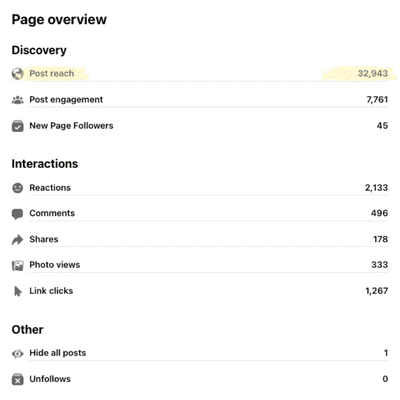
An important detail within a subcategory of reach metrics is the comparison between followers who have seen your content and non-followers. If many non-followers are seeing your content, it’s an indicator that your posts are resonating with your broader audience (winning).

Note: Reach is different from impressions, which may include multiple views of your posts by the same people. More on impressions in #4 below.
3. Engagement
Tracking social media engagement metrics (likes, comments, shares, mentions, and tags) brings clarity to what your audience wants from your platform and should drive your direction on what to publish and when. User actions that count towards engagement on Facebook and Instagram are:
● likes
● comments
● shares
● link clicks
● tags
● saves
● direct messages
● mentions (tagged)
● profile visits
● replies
● regrams (Instagram)
● texts
● calls
● sticker taps (Instagram Stories)
● emails
● “get directions” (Instagram only)
4. Impressions
The impressions metric highlights how often your content appears on someone’s screen. Marketing agencies love to share this metric with their clients because the numbers are usually impressive, but honestly, they don’t tell the whole story.
The impressions metric doesn’t define how many people “saw” your post or “engaged” with it – it literally shows how many times it was on screen, so it’s possible that those people scrolled right past your post. The value in tracking this data point is for the social media manager as it’s an indicator of the quality of one’s posts through time.
As a social media manager, it’s easy to get lost in the data and become paralyzed by what to post. Keep it simple! If you’re posting the same things as everyone else, then you’re not differentiating yourself from all the rest, which is kind of the point of social media.
5. Referrals
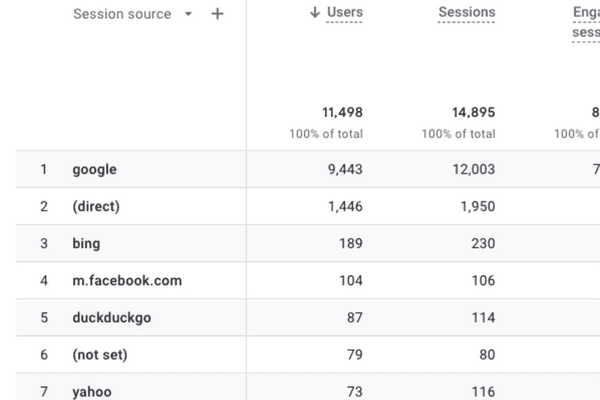
Referrals or “referral traffic” is the measurement of site traffic your website receives directly from social media or any other website.

If your goal is to increase website traffic, then this is a key data point to measure. To do this, social media managers should position links to site pages (like value-rich blog content) within social media posts. Tracking referral traffic can be done using Insights on Facebook or via Google Analytics.
How to Find Referral Traffic in Google Analytics 4 (GA4) 2023
Step 1: Log in to Google Analytics
Step 2: Navigate to the Reports tab on the left menu
Step 3: Select the dropdown arrow next to Acquisition
Step 4: Select Traffic Acquisition
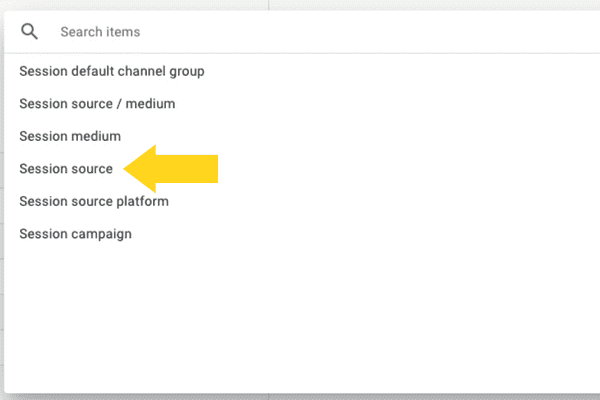
Step 5: Select the dropdown menu “Select default channel group”
Step 6: Select Session Source
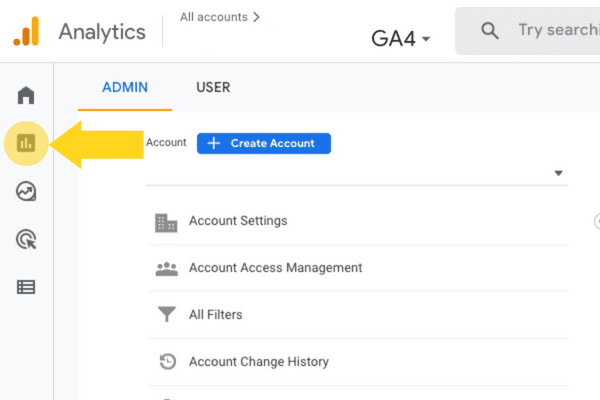
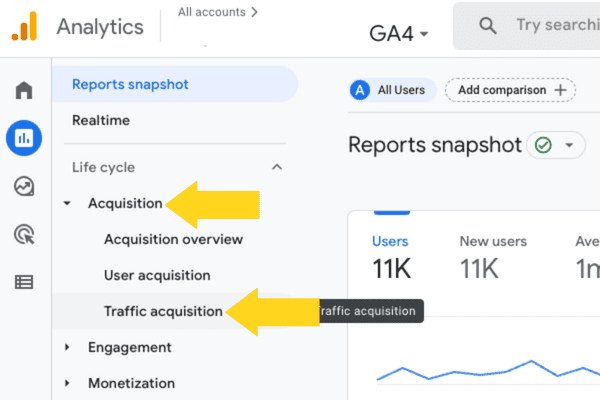
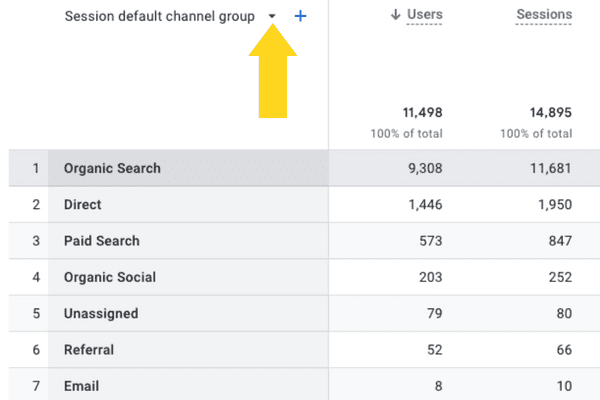
Step 5, Select the dropdown arrow to see more options
Understanding the data behind social media analytics goes beyond the five key metrics highlighted in this post. If interested in taking a deeper dive, we’ve provided some excellent resources below.
Resources for Understanding Social Media Tracking Platforms
● Facebook Help Center | Insights
● Instagram Help Center | Insights
● Twitter Help Center | Insights
● TikTok Help Center | Insights
● YouTube Help Center | Insights
AND FINALLY…
If you’re new to social media and feel intimidated by the glossary of social media data terms, and don’t want to deal with any of this … leave it to the experts at Two Step Social. Get in touch!
Meanwhile, those Diddy earworms got us curious. Did you know that Sean Combs – aka: Puffy, Puff Daddy, P. Diddy, Diddy, Sean John, Swag, Love, Brother Love – now goes by Diddy worldwide except for in the UK? There’s another artist in the UK who already uses the Diddy, so Puff had to stick with P. Diddy over there! #nowyouknow